Home appliances have functions that differ from country to country in order to fit with the cultural habits.
Home appliances have functions that differ from country to country in order to fit with the climate and the cultural habits. Also, the operation display is usually indicated only in the local language. Therefore, here is some information on how to use the most frequently used home gadgets in daily life – TV remote controls.
1.How to use a TV remote control
2.How to use an Air conditioner in Japan
How to use a TV remote control
Basic Operation: Turning ON/OFF, Volume adjustment, and channel selection
Though the button layout varies depending on the TV brand and its model, the buttons for basic operation are standardized and almost the same in design. Knowing of these buttons and the Japanese indication will allow you to understand the basic usage.
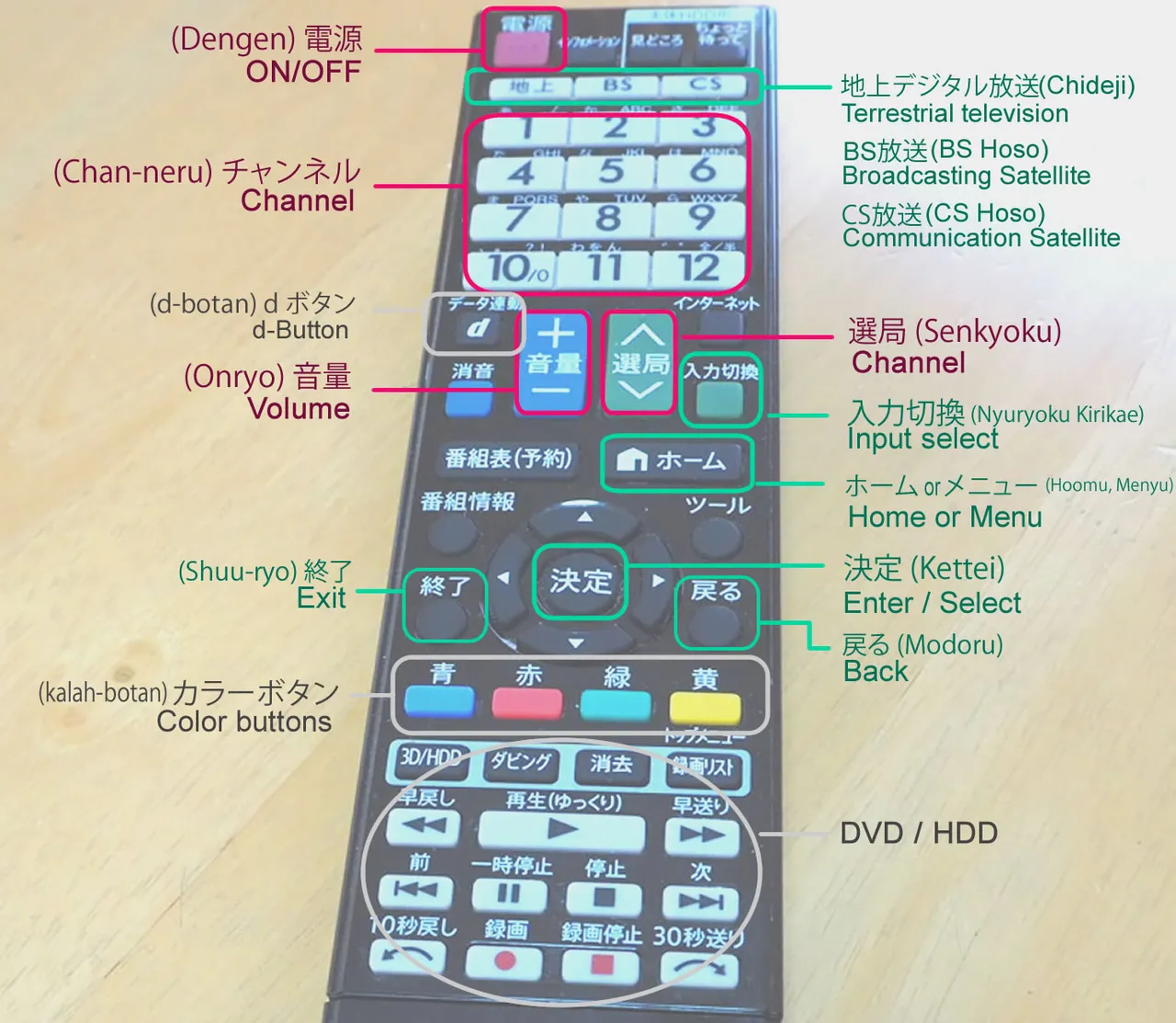
The buttons marked in red are for basic operation
電源 (Dengen)
ON/OFF Button
This button is commonly at the upper part of the controller
音量 (Onryo)
Volume
The button has “+” and “-“
チャンネル (Chan-neru)
Channel
Press the numbers or up-down icons to select the channel
Setting the function to watch TV in English
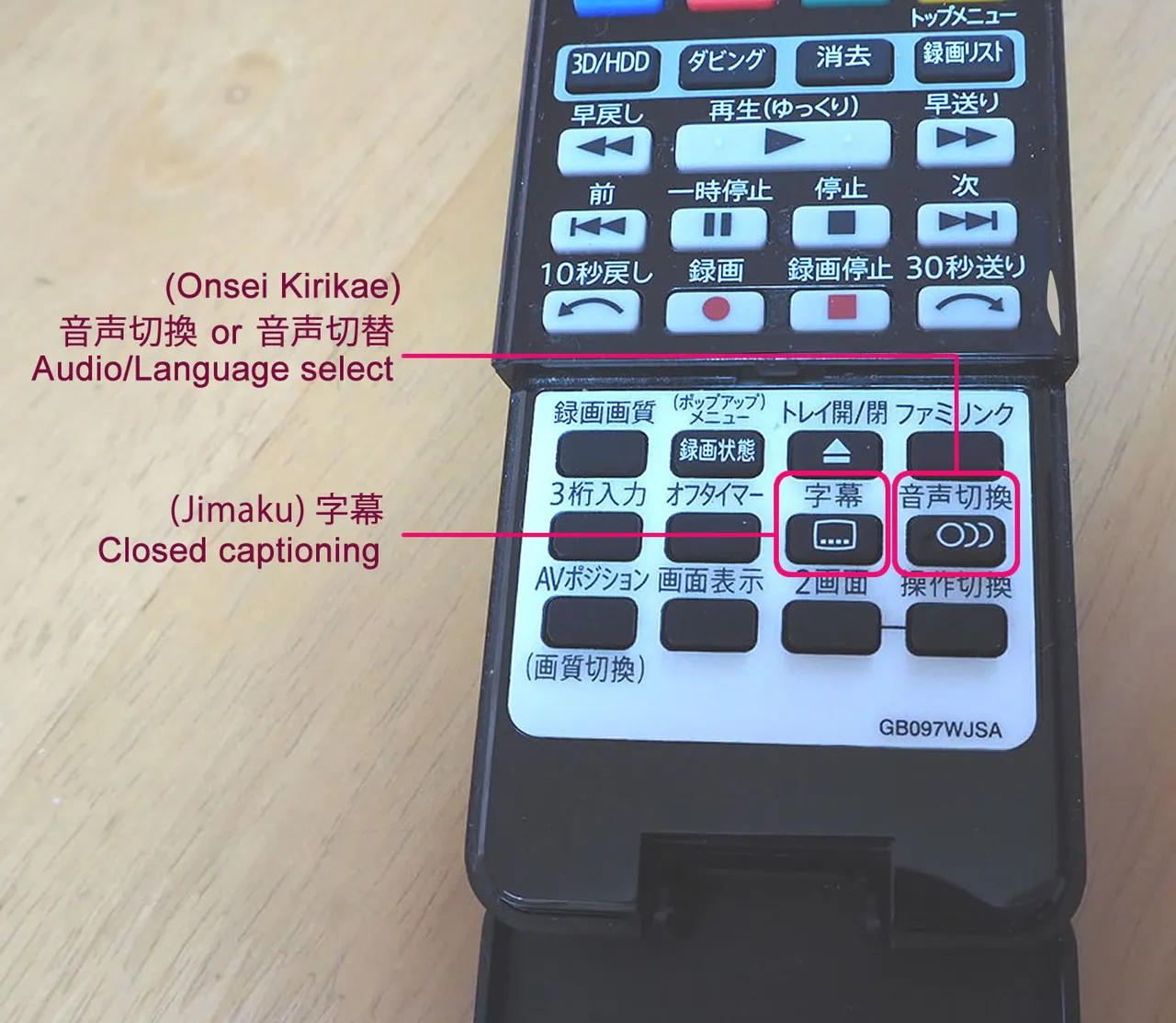
Select language by Audio/Language select button
Bilingual broadcasting (Japanese 日本語/English 英語) is available on some TV shows, switchable by changing the audio setting. For example, The News at 7:00 PM on NHK, Japan's national public broadcaster, is bilingual. American TV shows and movies are often broadcasted in Japanese and English as well.
To select language, press the button "音声切換" or "音声切替" (both pronounced "Onsei Kirikae") and use the up-down button to choose one of the audio options “primary or secondary” at the control panel displayed on TV screen. Then, press the select button "決定(Kettei) " to set.
The primary audio setting (主音声 Shuonsei) is usually Japanese, and the secondary (副音声 Fukuonsei ) is English. If you have difficulty in finding which is which on the control panel, select the lower one. The change of audio setting should be identified by listening to the sound.
Tips:
The audio setting is automatically reset every time you turn on and off the TV
If the audio setting is turned back to the default setting (Japanese) while you change channels or turn the TV on and off, you need to set the audio setting again by the steps described above.
Closed captioning
TV stations provide closed captioning to aid deaf and hearing-impaired audiences. The closed caption is not available on any programs, but some programs such as news come with captions that will be helpful for Japanese learners. As for English captions, pay-television may provide them on American TV shows and movies. To display the closed caption, press the captioning button " 字幕 (Jimaku)" then select from the options displayed on the control panel by pressing the select button "決定 (Kettei) ".
Tips
As TV remote controls are different in design, some of them have an open/close cover that may slide open. In case you cannot find the button for audio settings or closed captioning, check the cover and see the inside.
Other function buttons to know
Watching on TDB, BS, and CS
TV remotes in Japan have buttons; Terrestrial television (TDB), Broadcasting Satellite (BS) and Communication Satellite (CS). The regular broadcast is Terrestrial television 地上デジタル放送 Chijo digital Hoso (short in Chideji). Pressing the button BS or CS allows you to watch the paid television. If you do not have a contract for those pay television, an invalid message will appear on the screen when pressing the button.
Input select
The Input select button is to use external devices connected to the TV, for example, viewing photos in a camera on the TV screen, or watching movies saved on DVD/HDD. The control panel will appear on the screen by pressing the button "入力切換 (Nyuryoku Kirikae) " where you can designate one of the connected devices to use. The setting is done by pressing the up-down and Select "決定" button.
What’s d-Button?
The d-Button is to show the local updates, such as the weather forecast and the traffic report. Pressing the d-Button allows you to check the latest information any time you want.
What are the color buttons?
The 4 of colored buttons, red, blue, green, and yellow, are used when watching TV shows that include interactive communication, such as an opinion poll. For example, the show host calls the audience to press the red button to vote YES, etc. These buttons are rarely used.
Additional info: How to change the language display on the control panel
To switch the language display on the control panel, press the button "Menu (メニュー)" or "Home (ホーム)" on the remote, then select the required function displayed on the screen. As the setting method differs depending on the TV brand or its model, you should refer to the manual that will be available online. The English manual will also be found online by searching on a keyword phrase including "the brand name", and the words "TV remote", and "manual".
How to use an Air conditioner in Japan
In Japan, except for cold regions in the north, ordinary houses have air conditioners or Air-con (エアコン) to control room temperature.
The remote control of air conditioners is basically standardized so that it enables simple operation by understanding the main buttons. However, the button layout is quite a change as each brand provides different functions other than a basic operation. Also, the recent types of remote are much different from the former ones.
The remote control for recent models is quite simple in operation
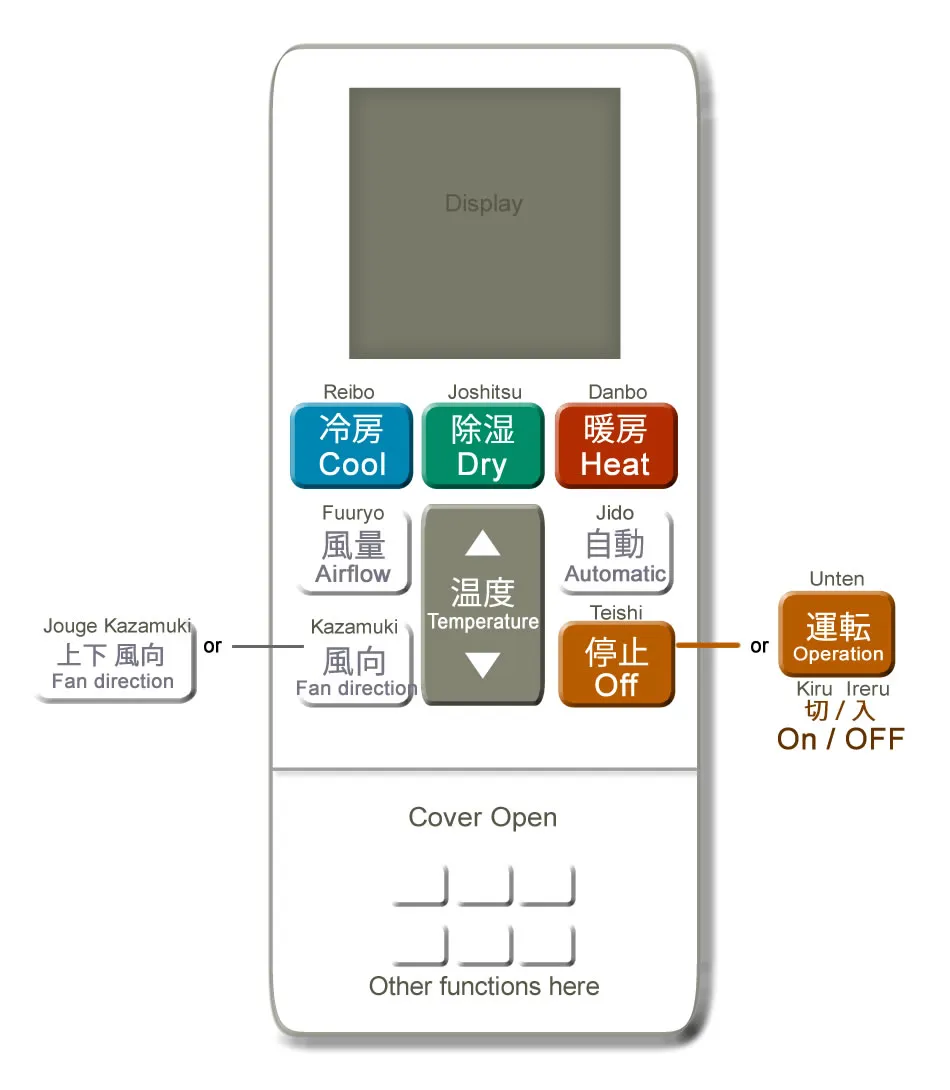
The main buttons to operate the air conditioner are;
冷房 (Reibo)
Cool
This turning-on button is usually colored in blue
暖房 (Danbo)
Heat
This turning-on button is usually colored in red or pink
停止 (Teishi)
OFF
The button for turning off.
温度 (Ondo) または 室温(Shitsuon)
Temperature
Press up-down icons to adjust the room temperature
除湿 (Joshitsu)
Dry
This button is usually colored in green
The Dry function is to reduce humidity while cooling down the room.
In Japan, the humidity is fairly high through the rainy season in June to summer in August when this dehumidifying function can be of help.
風向 (Kazamuke) or 上下風向 (Jouge Kazamuki)
Fan direction
You can change the fan direction by pressing this button.
風量 (Fuuryo)
Airflow
You can change the strength of airflow by pressing this button.
自動 (Jido)
Automatic operation
Some models have this function, allowing automatic adjustment to keep an ideal room temperature.
Other functions
Other functions, such as Eco-operation (energy saving) and auto-cleaning, may be provided depending on the type of air conditioners. Some types of the remote have open/close cover where you will see function buttons inside. To find how to use the functions, see the manual for your air-conditioner. The English manual will be searchable online.
For those having difficulty in understanding Japanese, it is convenient to use a mobile APP to control air conditioner. The APP is usually bilingual, also allows you to control your air conditioner when you are away from home. The APP will be downloadable on Google Play or those websites.
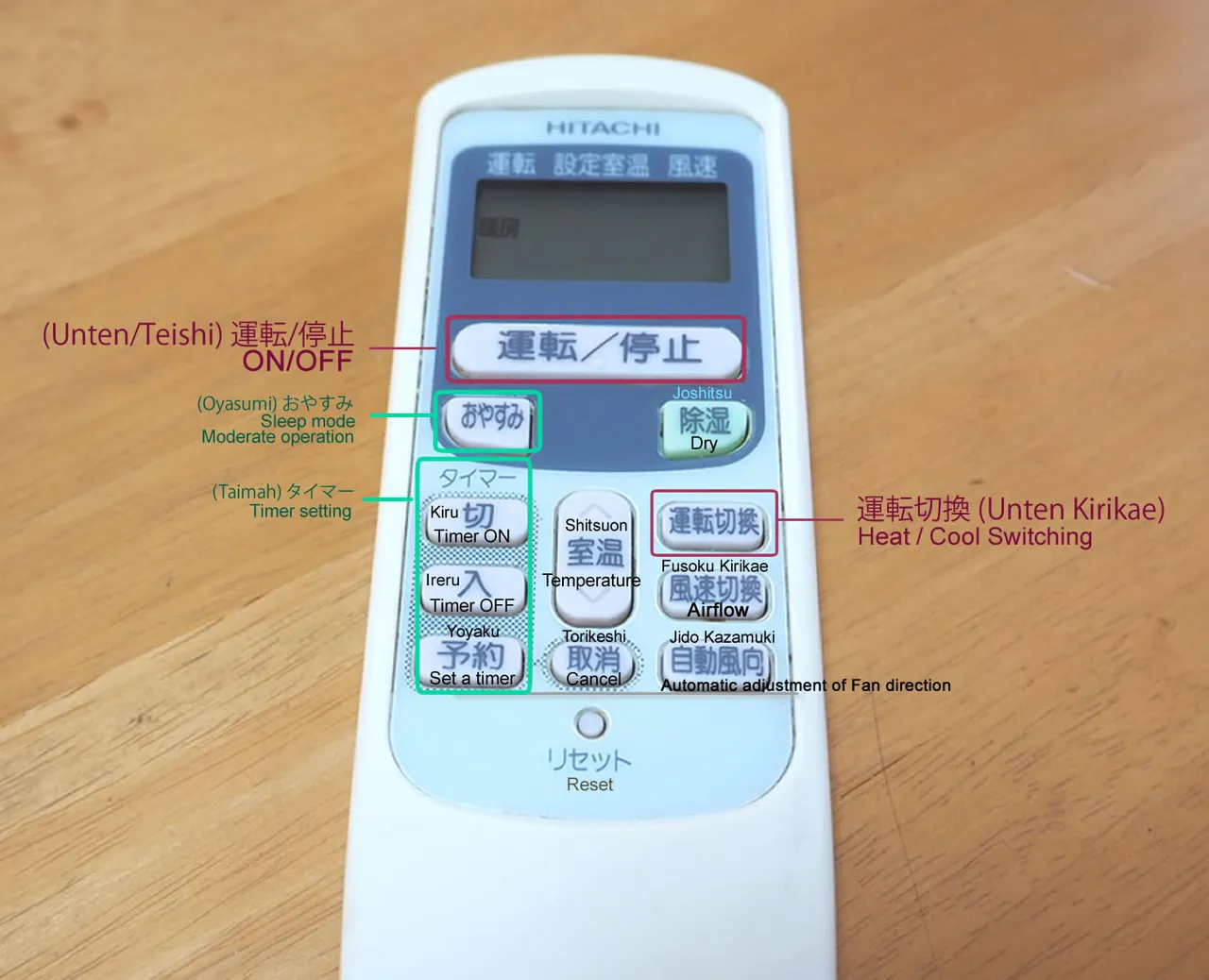
Additional information: Former types of Air-con remote control
The old types of air-con remote like the one below are still in use in many places. You will find them at a hotel or ryokan accommodation.